Master Affinity for Sewing Pattern Alterations

Alter PDF Sewing Patterns Digitally—Accurately, Confidently, and Without the Paper Mess

If you love sewing but dread pattern alterations, you’re not alone. Taping paper. Redrawing lines. Wondering if you just ruined your pattern before you even sew a test garment. Master Affinity for Sewing Pattern Alterations teaches you how to confidently alter PDF sewing patterns digitally using Affinity—with clear, step-by-step instruction designed specifically for sewists. This is a Founding Member launch, which means early access, special pricing, and a chance to help shape the final version of the course.
Logo for Master Affinity for Sewing Pattern Alterations Course

Open for Pre-Enrollment!

Founding Member Pricing

The course is not available for viewing yet, but is open for pre-enrollment. Founding members will be granted access to the course beginning on February 12, 2026. As a founding member, you will be the first to walk through the lessons and have the opportunity to provide feedback on the lesson material. You will also get lifetime access to the course and any lesson updates. Lock in the low founding member price before it goes up during the official launch!

Who This Course Is For?

This course is for sewists who:

  • Use PDF sewing patterns (especially projector files)

  • Want accurate, repeatable alterations

  • Are tired of paper methods that take forever

  • Prefer clear, straightforward teaching without fluff

  • Tired of muddling through videos designed for graphic designers

  • Use a projector for cutting out or tracing sewing patterns

You do not need:

If you can sew garments and open a PDF, you can do this.

  • Prior Affinity knowledge

  • Tech confidence

  • Pattern drafting experience

Limited Time Offer!

Founding member pricing is only available for a limited time! Act now to secure special pricing! (Final pricing will be higher once fully released.)

  • 00 Days
  • 00 Hours
  • 00 Minutes
  • 00 Seconds

What's included?

    1. Download Affinity

      FREE PREVIEW
    2. Overview

      FREE PREVIEW
    3. Open, Save, Export

    4. Password Protected Patterns

    5. Navigate and Zoom

    6. Practice for Introduction to Affinity

    1. Select and Transform

    2. Fill and Stroke

    3. Layers Panel

    4. Pen Tool

    5. Node Tool

    6. Draw Shapes

    7. Text Tool

    8. Grouping and Arranging

    9. Boolean and Shape Builder

    10. Guides

    11. Practice Exercise: Doll Skirt

    1. Selecting and duplicating

    2. Grouping/Ungrouping

    3. Unfold, Mirror

    4. Cut and Join Pattern Pieces

    5. Measuring

    6. Seam Allowance

    7. Practice Exercise: Foundations Pattern Work

    1. Multi-page Pattern to Projector File

    2. Increase line visibility

    3. Disjointed Pattern Lines

    4. Pattern Tetris

    5. Non-layered or Image Patterns

    6. Practice Exercise: Improving Files

    1. Grade between sizes

    2. Lengthen/Shorten

    3. Slash and Spread

    4. Rotate and Pivot

    5. Darts

    6. Transfer Toile Markings

    1. Introduction to Advanced Adjustments

    2. Bust: Darted FBA

    3. Bust: Princess Seam FBA

    4. Shoulder: Sloping Shoulder

    5. Shoulder: Wide shoulder adjustment

    6. Neck: Gaping neckline

    7. Back: Swayback Adjustment

    8. Back: Rounded Upper Back

    9. Bottom: Crotch Curve

About this course

  • 45 lessons
  • 6 hours of video content
  • Discussion community
  • Step-by-step lessons
  • Real sewing pattern examples

FAQ

  • Do I need prior experience with Affinity?

    No. This course is beginner-friendly and starts from the basics, with explanations tailored specifically for sewists.

  • Is this course only for projector sewing?

    The techniques taught in this course pair beautifully with projector sewing. You can start with any-sized PDF sewing pattern, but this course only reviews how to export PDF Projector Files and doesn't cover printable pattern files.

  • What version of Affinity do I need?

    The course is taught using the FREE Affinity by Canva, and the concepts apply across previous versions of Affinity Designer. Specific setup guidance is included for Affinity by Canva.

  • What does “Founding Member” mean?

    Founding Members get early access to the course at a discounted price while it’s still being tested and adjusted according to student needs. Some lessons may be added or changed based on feedback. You’ll receive all updates and added lessons automatically—at no extra cost.

  • Will I keep access forever?

    Yes. Once you join, you’ll have lifetime access to all course content.

  • Is this course right for me if I’ve never used Affinity?

    Absolutely. This course is designed specifically to remove confusion and help you understand what’s happening and how to use Affinity to get your desired results—step by step.

Meet Your Instructor

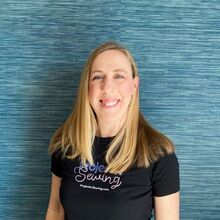
Sheredith Hardy

Projector Sewing Educator

Hi, I’m Sheredith Hardy, Projector Sewing Educator. I’ve spent over five years teaching sewists how to use digital tools for sewing—especially projector sewing and pattern alterations. I’m known for my clear, to-the-point teaching style and for breaking down complicated topics into practical, usable steps. Using digital tools brought joy and creativity back into my sewing. This course is designed to help you experience that same freedom.

Reviews of Past Courses

5 star rating

Projector Course

Eileen Wardle

If i would of purchased the course, I wouldn't have become frustrated and wasted time trying to figure out if this was something that I would be able to do.

If i would of purchased the course, I wouldn't have become frustrated and wasted time trying to figure out if this was something that I would be able to do.

Read Less
5 star rating

The Joy of Sewing Has Returned!

Michelle McKeag

Hallelujah! The joy of sewing has returned! No more taping together patterns and paper alterations. Projector sewing, along with using this course has saved me MONTHS of self learning. I'm excited to sew again because making computer alteratio...

Read More

Hallelujah! The joy of sewing has returned! No more taping together patterns and paper alterations. Projector sewing, along with using this course has saved me MONTHS of self learning. I'm excited to sew again because making computer alterations to the patterns is SO MUCH easier now. Thank you Projector Sewing and Sheredith for putting together the course!

Read Less
5 star rating

This is a real eye-opening course

Carolf 5819

I downloaded this course almost a year ago. I didn't start really using it until now. The information is so helpful.

I downloaded this course almost a year ago. I didn't start really using it until now. The information is so helpful.

Read Less
5 star rating

Worth the money 💰

c fletch

After buying my projector and getting it set up I had no of how to alter patterns with it. So I was limited in its use. So I started searching YouTube and found projector sewing . I was hesitant about spending the money but it has been well worth...

Read More

After buying my projector and getting it set up I had no of how to alter patterns with it. So I was limited in its use. So I started searching YouTube and found projector sewing . I was hesitant about spending the money but it has been well worth it. Everything is explained and shown clearly. I am really happy that I purchased this because it has eliminated me having to look all over YouTube for different videos and information. If you have a projector and you plan on using it for sewing you need to buy this course. I am still going through the course and I really like that I can come back to it if I need it. Thanks you for making this course because I was lost.

Read Less
5 star rating

Awesome Detailed Information for Sewists

Zelda Pierce

I am truly enjoying and learning how to use Inkscape to alter my sewing patterns. There is more information in this course that is extremely valuable to sewists. I highly recommend this course to learn how to use Inkscape to alter your patterns.

I am truly enjoying and learning how to use Inkscape to alter my sewing patterns. There is more information in this course that is extremely valuable to sewists. I highly recommend this course to learn how to use Inkscape to alter your patterns.

Read Less
5 star rating

Drop the fear and just do it!

Dianne Bernasconi

I purchased the course a while ago, but it took a required bed rest to have time and peace of mind, and loosing the fear to get going. I love the way Sherilyn explains, and shows the process. And I love that I can stop and start if I need more t...

Read More

I purchased the course a while ago, but it took a required bed rest to have time and peace of mind, and loosing the fear to get going. I love the way Sherilyn explains, and shows the process. And I love that I can stop and start if I need more time to understand. With the exile of the Big 4, Projector Sewing will be compared to the transition of first huge clumsy computers to our laptops

Read Less

Never Make a Paper Pattern Alteration Again!

Learn to Master Affinity for sewing and pattern alterations!